My Homelab Journey: Moving from a Synology NAS to unRAID on an Intel NUC
A NUC has no PCIe slot and no drive bays, so the M.2 slot became a 6-port SATA controller, a used ATX PSU powers and cools four drives, and the whole thing fits the wall rack with 1 mm to spare.
HomeLab, The journey. Updated . 4 min read.
My NUC has no PCIe slot and nowhere to put a 3.5" drive. It now runs an unRAID array of four 4TB drives anyway, and the whole thing fits the wall rack with about 1 mm to spare.
The trick is the NUC's M.2 slot. It doesn't hold an SSD. It holds a SATA controller, and the cables come out of the NUC and into a drive enclosure that sits under it.
TL;DR: an NVMe-to-SATA adapter (ASM1166, six ports) in the M.2 slot, a 4-bay enclosure for the drives, and a used ATX PSU jumpered on to power them. The PSU's fan cools the drives too, so the enclosure fan could go. The Synology got sold, its two drives moved into the enclosure, and I finished the switch in January 2025.
Why I left the Synology
In the last part the NUC ran Ubuntu and mounted four shares from a two-bay Synology DS223j over CIFS. It worked, but every part of it annoyed me a little more over time:
- No real parity. Two drives gave me no RAID that fit both media and backups, so I split each drive into volumes and copied the backups across by hand. That's a copy, not redundancy, and only for the part I remembered to copy.
- Storage over the network. Every Docker volume that lived on the NAS went through a CIFS mount. Media, backups, and app data all crossed the network twice, and it felt slow next to a local disk.
- Two boxes. Two systems to update and two places to look when something broke.
- Growth. A two-bay NAS is full at two drives. unRAID lets me add a disk of any size, one at a time, and keep one parity disk across all of them.
- And I wanted to tinker. That one is honest. A homelab you never touch is just an appliance.
unRAID fixes the first four in one move: the disks are local, parity covers the whole array, and storage plus Docker live in one web UI on one machine.
The problem: a NUC is not a NAS
The NUC8i7BEH is a great little server: an i7-8559U and 32GB of RAM in a box the size of a sandwich. But it has exactly two storage connections: one M.2 slot and one 2.5" SATA bay. No PCIe slot for an HBA, and no room for even one 3.5" drive.
So:
- The 2.5" bay holds a 1TB PNY SSD. That's the cache and app data, on the NUC's own SATA port.
- The M.2 slot holds an NVMe-to-SATA adapter with an ASM1166 controller. It's an M.2 card that shows up as a PCIe SATA controller with six ports. Four SATA data cables leave the NUC from it.
The ASM1166 is the chip people usually pick for this, because it's cheap and unRAID sees it without any driver work. The NUC doesn't care that the M.2 slot isn't holding a disk. To the kernel it's just a PCIe device.
Drives, enclosure, and a PSU with two jobs
The four 4TB WD Purple drives sit in a 4-bay enclosure right under the NUC. Two of them came out of the Synology, which I sold. One is parity and three are data, for 12TB usable.
Four 3.5" drives need their own 12V and 5V power, and a NUC has nothing to give them. I used a used Gigabyte GP-P450B ATX PSU. With no motherboard to tell it to turn on, it needs a jumper: bridge PS_ON (the green wire) to a ground (any black wire) on the 24-pin plug, and it starts on its own switch. One of its SATA power strands feeds the enclosure backplane.
The PSU also does the cooling. I hated the enclosure's fan, so I don't use it. The PSU sits right beside the drives, and its fan keeps air moving past them. One part, two jobs.
The fit
The rack is a 12U cabinet built into the wall, which the house came with for the ISP gear. The fiber ONT and the network gear live on the shelf, and the patch panel sits above them. The NUC, the enclosure, and the PSU had to fit in the space under that shelf.
They do, with about 1 mm to spare. It's a very tight fit.
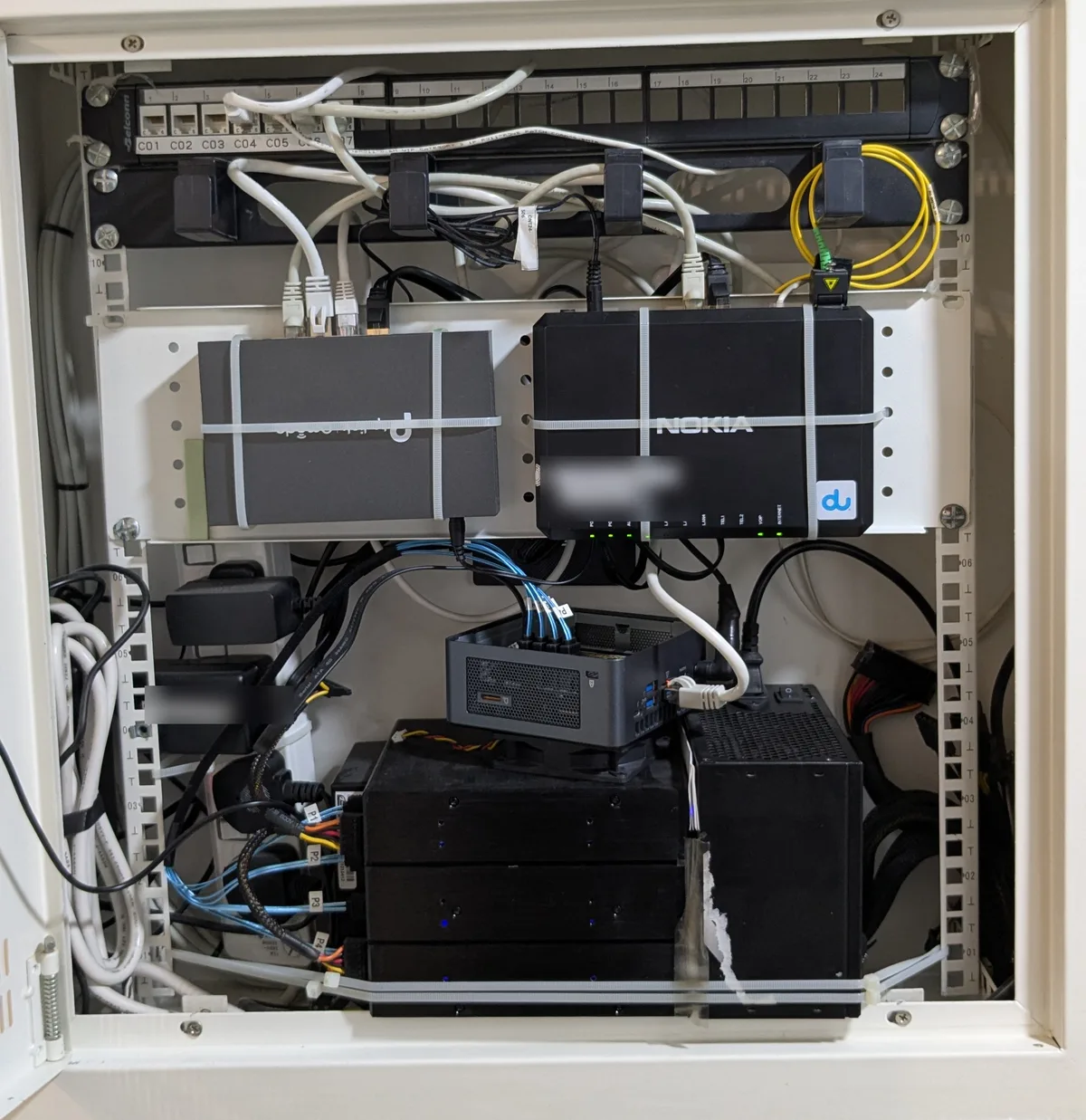
The blue cables are the SATA data lines from the M.2 adapter. They run out of the NUC and down into the enclosure. Everything is held with cable ties, because there's no room left for anything else.
unRAID itself
unRAID boots from a USB stick, and the license is tied to that stick. I bought a lifetime Plus license back when unRAID still sold the old one-time licenses, so updates never cost me anything. The current Starter and Unleashed tiers only include a year of updates. The drives are just a pool it builds parity across. A disk that joins the array gets cleared, so the two Synology drives had to be empty before they went in.
It ran 7.0.1 until I upgraded straight to 7.3. The containers that used to live on Ubuntu now run as unRAID Docker apps, with their data on the SSD cache and the media on the array.
What I'd watch
The SATA power cable is the weak point of a build like this. Every drive hangs off a plug on one strand, and one bad plug hurts all of them. In August 2026 a single bad plug on that strand knocked three drives off the bus at once. The drives were fine. The plug wasn't.
If you copy this build, spread the drives over more than one power strand from day one.
Questions
- Can an Intel NUC run unRAID with several hard drives?
- Yes. A NUC has no PCIe slot and no 3.5 inch bays, but its M.2 slot can take an NVMe-to-SATA adapter with an ASM1166 controller, which gives six SATA ports. The drives then sit in an external enclosure with their own power supply.
- How do I power hard drives from an ATX PSU without a motherboard?
- Jumper the PS_ON pin (green) to any ground pin (black) on the 24-pin connector, or use a 24-pin jumper plug. The PSU then turns on with its own switch, and its SATA power cables feed the drives.
- Why move from a Synology NAS to unRAID?
- For me: real parity instead of hand-made copies, local disks instead of CIFS mounts over the network, one box to manage for storage and apps, and an array that grows one disk at a time.